

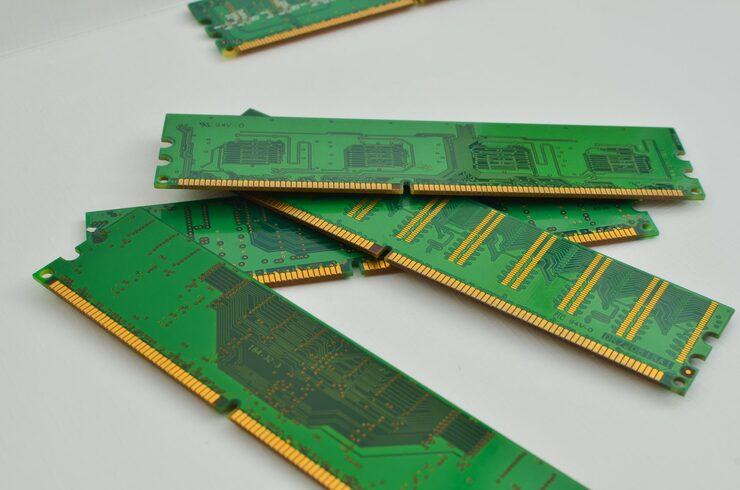
Memory has a direct effect on how well a computer or server handles everyday tasks. From running business applications to managing large databases, the right RAM helps systems process information efficiently. DDR4 Memory Modules remain a practical choice for many businesses because they offer good speed, reliable performance, and support for a wide range of computing systems. Ram Exchange, a DRAM supplier serving businesses since 2006, provides memory solutions for computers, laptops, and servers. Understanding DDR4 specifications, compatibility, and module types can help IT teams select suitable memory, plan upgrades, and maintain reliable system performance without spending more than necessary.
What Are DDR4 Memory Modules?
DDR4 stands for Double Data Rate 4, a fourth-generation type of synchronous dynamic random-access memory (SDRAM). It stores temporary data that a computer or server needs while running applications and processing tasks. Unlike storage drives, which retain information after a system shuts down, RAM holds data temporarily for quick access by the processor. Having enough memory allows a system to handle multiple applications and tasks without unnecessary delays.
DDR4 was introduced as an improvement over DDR3. It offers higher data transfer rates, improved power efficiency, and support for larger memory capacities.
Some common DDR4 specifications include:
- Operating voltage: Standard DDR4 memory generally operates at 1.2 volts.
- Data transfer speeds: Common speed ratings range from 2133 MT/s to 3200 MT/s.
- Module pins: Standard desktop and server DIMMs typically use 288 pins, while laptop SO-DIMMs use 260 pins.
- Memory capacity: Available capacities depend on the module type and system support.
- Power efficiency: Lower operating voltage helps reduce memory power consumption compared with standard DDR3.
These features make DDR4 suitable for different computing environments, including office computers, workstations, and enterprise servers.
How DDR4 Affects System Performance
RAM affects how quickly a system can access active data. When a computer has enough compatible memory, it can run applications, switch between tasks, and process information more efficiently. Several factors determine the performance of a DDR4 module.
Memory Speed
Memory speed refers to how quickly RAM transfers data. It is usually shown in megatransfers per second (MT/s). Higher transfer rates provide greater memory bandwidth, which can help applications that handle large amounts of data.
For example, DDR4-3200 offers a higher transfer rate than DDR4-2400. However, the actual operating speed also depends on the processor, motherboard, and supported memory configuration.
Memory Capacity
Capacity determines how much active data a system can hold in memory at one time. Systems with insufficient RAM may rely more heavily on slower storage drives, which can affect responsiveness.
Different workloads require different memory capacities:
- Basic office applications can operate with relatively modest memory.
- Business workstations may need more RAM for design software and large files.
- Database servers often require higher capacities to manage active records and queries.
- Virtualized environments need sufficient memory to support multiple virtual machines.
Selecting the right capacity helps prevent memory shortages during regular operations.
Latency
Memory latency measures the delay between a request for data and the delivery of that data. It is commonly represented by CAS latency (CL).
A lower CAS latency can reduce certain access delays, but latency should always be considered alongside memory speed. Comparing latency numbers alone does not provide a complete picture of overall performance.
Different Types of DDR4 RAM
DDR4 is available in several module types. Each is designed for particular hardware and computing requirements.
Unbuffered DIMM (UDIMM)
UDIMMs are commonly used in desktop computers and some workstations. They do not have a register between the memory controller and DRAM chips.
Standard non-ECC UDIMMs are suitable for general computing, office applications, and everyday workloads. ECC UDIMMs are also available for systems that support error correction.
Registered DIMM (RDIMM)
Registered DIMMs include a register that helps manage electrical demands on the memory controller. They are commonly used in servers that require larger memory capacities and multiple installed modules.
RDIMMs are suitable for business environments running databases, virtualization platforms, and enterprise applications.
Load-Reduced DIMM (LRDIMM)
LRDIMMs use memory buffers to reduce the electrical load placed on the server’s memory controller. This allows supported systems to use higher memory capacities across multiple slots.
They are often found in servers designed for memory-intensive workloads.
Small Outline DIMM (SO-DIMM)
SO-DIMMs are smaller memory modules designed for laptops, compact computers, and certain small-form-factor systems. DDR4 SO-DIMMs have a different physical size and pin count from standard desktop DIMMs.
These module types are not interchangeable, so buyers should check their system requirements before ordering.
DDR4 Compatibility: What Should You Check?
Choosing RAM based only on its capacity or speed can lead to compatibility problems. A module must match the hardware specifications of the computer or server.
Review these factors before purchasing:
- Motherboard support: Confirm that the motherboard supports DDR4 and the required memory capacity.
- Processor limitations: Check the processor’s supported memory speeds and configurations.
- Module type: Verify whether the system requires UDIMM, RDIMM, LRDIMM, or SO-DIMM.
- ECC support: Confirm whether the system needs error-correcting memory or standard non-ECC RAM.
- Capacity limits: Check the maximum supported capacity per slot and across the entire system.
- Memory speed: Select a speed supported by the processor and motherboard.
- Slot configuration: Follow the manufacturer’s installation recommendations for memory channels and slot population.
DDR4 and DDR3 are not interchangeable because they have different electrical and physical designs. Even if two modules look similar, their notches and pin arrangements prevent them from being used in the same memory slot. Registered and unbuffered memory should also not be mixed in a system that does not support such a configuration.
Where Are DDR4 Memory Modules Used?
DDR4 supports a broad range of computing applications. Its combination of capacity options, transfer speeds, and power efficiency makes it useful across different business environments.
Desktop Computers: Office computers use DDR4 for daily tasks such as document editing, spreadsheets, web applications, and communication software.
Business Workstations: Workstations use higher memory capacities to support graphic design, engineering applications, video editing, and other demanding tasks.
Enterprise Servers: Servers rely on compatible DDR4 memory to run databases, business applications, file services, and virtualization environments.
Data Centers: Data centers use server memory to support workloads that require consistent access to large amounts of active data.
Virtual Machines: Virtualization platforms divide available physical memory among multiple virtual machines. Sufficient RAM helps each machine run its assigned applications and services.
The correct module depends on the workload, hardware configuration, and performance requirements of the system.
Choosing the Right DDR4 RAM for Business Requirements
Businesses should evaluate their current infrastructure before purchasing additional memory. An upgrade should address an actual capacity or performance requirement rather than simply adding more RAM.
Consider these practical steps:
- Review current memory usage: Check how much RAM existing applications and workloads consume during normal operations.
- Identify upgrade requirements: Determine whether the system needs additional capacity, a different module type, or a compatible replacement.
- Check manufacturer specifications: Use the server or motherboard documentation to confirm supported memory configurations.
- Compare module specifications: Review capacity, speed, ECC support, rank, and module type before making a selection.
- Consider future requirements: Allow room for expected workload growth while staying within hardware limits.
Businesses planning a server upgrade can also consult experienced memory suppliers. Ram Exchange works with business customers and provides DRAM options for different computing requirements, including standard and hard-to-find legacy memory technologies. Organizations planning to buy dell server memory or source other server RAM should confirm the exact server model and supported memory configuration first. Selecting compatible modules helps avoid installation issues and unnecessary replacement costs.
Why Memory Quality and Testing Matter
Memory quality affects system stability, particularly in business environments where servers support daily operations. A faulty or incompatible module can cause unexpected restarts, system errors, or application interruptions.
Before installing new or replacement RAM, businesses should consider:
- Checking the module’s part number and specifications.
- Confirming compatibility with the target system.
- Reviewing the condition of used or refurbished memory.
- Ensuring the modules have been tested before installation.
- Keeping records of installed memory configurations.
Ram Exchange supplies memory for computers, laptops, and servers, with new, used, and refurbished options. The company also highlights product testing, quality checks, and support for business customers with different sourcing requirements.
Making the Right DDR4 Memory Choice
DDR4 remains a useful memory option for many existing computers, workstations, and enterprise servers. Understanding module types, speed ratings, capacity, and hardware compatibility makes it easier to choose RAM that meets actual computing requirements. Careful selection also helps businesses plan upgrades and avoid purchasing unsuitable components. Contact us today to explore suitable DDR4 memory solutions for your computing and server requirements.
