

Financial applications need accurate and consistent fund data to help investors monitor portfolios, compare investment products, and understand market movements. Whether you are developing an investment dashboard, portfolio management platform, financial research tool, or trading application, accessing fund prices and Net Asset Value (NAV) programmatically can make your platform more efficient and informative.
A mutual fund API provides a structured way to retrieve fund information through software instead of manually collecting prices from financial websites or downloading spreadsheets. Developers can use these interfaces to integrate fund quotes, historical prices, valuation estimates, and other market information directly into their applications.
With growing demand for automated investment tools, choosing a reliable financial data provider is an important part of building a scalable application. Platforms such as iTick provide fund market data through REST and WebSocket interfaces, helping developers access fund-related information using standardized API requests.
What Is a Mutual Fund API?
A mutual fund API is a programming interface that allows applications to retrieve financial information about mutual funds and exchange-traded funds (ETFs). Instead of manually checking fund websites, developers can send requests to an API endpoint and receive structured responses containing available market information.
Depending on the provider and supported fund types, this information may include:
- Latest fund prices
- Net Asset Value (NAV)
- Indicative Optimized Portfolio Value (IOPV)
- Daily price changes
- Trading volume
- Historical price information
- Opening, highest, and lowest prices
- Fund trading status
- Market timestamps
These data points help developers build applications that display fund performance, track investment portfolios, and analyze historical market movements.
It is important to distinguish between exchange-traded fund prices and traditional mutual fund NAV. ETFs generally trade throughout the exchange session, while many traditional mutual funds calculate their official NAV once per business day after the market closes.
Understanding Fund Prices and NAV
Before integrating fund information into an application, developers should understand the difference between market prices and NAV.
1. Market Price
The market price represents the current price at which an exchange-traded fund is trading. It changes during market hours as buyers and sellers place orders.
For example, an ETF might trade at $105.50 in the morning and move to $106.20 later in the session.
Applications can use market prices to display current valuations and monitor price movements.
2. Net Asset Value (NAV)
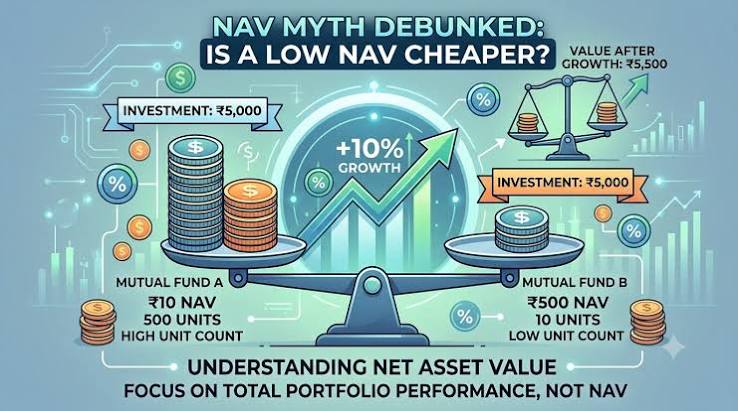
Net Asset Value represents the value of a fund’s assets minus its liabilities, divided by the number of outstanding shares.
The basic calculation is:
NAV per Share = (Total Assets − Total Liabilities) / Outstanding Shares
Traditional mutual funds generally publish their official NAV at a scheduled valuation time. This makes NAV useful for understanding the underlying value of a fund rather than its continuously changing exchange price.
3. Indicative NAV (IOPV)
Indicative Optimized Portfolio Value (IOPV) provides an estimated intraday value for certain exchange-traded funds.
It helps investors compare an ETF’s current market price with an estimated underlying portfolio value.
For example:
- ETF market price: $105.80
- Indicative NAV: $105.50
- Difference: $0.30
The difference may indicate that the ETF is trading at a premium to its estimated value.
IOPV is an estimate, not necessarily the fund’s official published NAV. Developers should clearly identify the type of valuation displayed in their applications.
Why Developers Need Programmatic Fund Data
Manually collecting financial information becomes difficult when an application needs to monitor hundreds or thousands of funds.
Automated data access offers several advantages.
Automated Price Updates
Developers can retrieve fund prices without repeatedly checking individual websites. API integration makes it easier to update dashboards and portfolio monitoring tools.
Portfolio Valuation
Investment platforms can combine fund prices with user holdings to calculate estimated portfolio values.
For example, if a user owns 100 ETF shares priced at $105.50, the estimated market value is $10,550.
Historical Performance Analysis
Historical price information allows applications to calculate returns, identify trends, and compare performance over different periods.
Improved User Experience
Investors can view fund information in one interface instead of switching between multiple financial websites.
Scalable Applications
A standardized API makes it easier to expand an application as the number of supported funds and users increases.
How to Retrieve Fund Prices Using iTick
iTick provides financial market data interfaces covering stocks, forex, futures, indices, cryptocurrencies, and funds.
Its fund data offering includes REST API endpoints for retrieving ETF and LOF quotes, tick information, historical price data, and other available fund market information.
Developers can use these endpoints to integrate fund information into websites, mobile applications, and financial dashboards.
The official documentation is available at:
Step 1: Obtain an API Key
Start by visiting the iTick website and registering for an account.
After obtaining API credentials, keep your API token secure. Avoid exposing private credentials in publicly accessible JavaScript files or frontend applications.
Step 2: Understand the Fund Quote Endpoint
The fund quote endpoint allows developers to retrieve the latest available quote for a specific fund.
The request uses the following structure:
GET https://api.itick.org/fund/quote?region=US&code=QQQ
The request includes two important parameters:
- region: Identifies the market, such as US, HK, SH, SZ, JP, or KR.
- code: Specifies the fund symbol.
For authentication, include your API token in the request headers.
Step 3: Make a Request Using Python
Python is a popular choice for financial applications because it provides straightforward HTTP request handling and data processing capabilities.
Here is a basic example:
import requests
url = “https://api.itick.org/fund/quote”
params = {
“region”: “US”,
“code”: “QQQ”
}
headers = {
“accept”: “application/json”,
“token”: “YOUR_API_TOKEN”
}
response = requests.get(
url,
params=params,
headers=headers,
timeout=15
)
response.raise_for_status()
result = response.json()
print(result)
Replace YOUR_API_TOKEN with your actual API credential.
The application sends a request to the fund quote endpoint and receives a JSON response containing the available quote information.
Step 4: Understand the API Response
A typical response structure contains fields such as:
{
“code”: 0,
“msg”: null,
“data”: {
“s”: “QQQ”,
“ld”: 613.7,
“o”: 622.08,
“p”: 622.08,
“h”: 623.54,
“l”: 611.36,
“t”: 1765573199000,
“v”: 71141919,
“tu”: 43822640541.4171,
“ch”: -11.88,
“chp”: -1.9,
“ts”: 0
}
}
The values above are an example from the documented API response, not live prices.
Important response fields include:
| Field | Description |
| s | Fund symbol |
| ld | Latest price |
| o | Opening price |
| p | Previous closing price |
| h | Highest price |
| l | Lowest price |
| t | Latest trade timestamp |
| v | Trading volume |
| tu | Trading amount |
| ch | Price change |
| chp | Percentage change |
| ts | Trading status |
Developers can map these fields to their application’s database or user interface.
Retrieving Multiple Fund Quotes
Some financial applications need to monitor several funds simultaneously.
Instead of making separate requests for every symbol, developers can use a batch quote endpoint.
iTick provides the following endpoint:
GET https://api.itick.org/fund/quotes?region=US&codes=QQQ,IEF
The codes parameter accepts multiple fund symbols separated by commas.
For example, a portfolio dashboard could request quotes for different ETFs and display their latest prices, percentage changes, and trading volumes in one interface.
The maximum number of symbols supported in a batch request depends on the subscription plan.
Batch requests can reduce the number of individual API calls and simplify data collection workflows.
Documentation:
Accessing Historical Fund Prices
Current prices are useful for monitoring markets, but many financial applications also need historical information.
Historical data helps developers build performance charts, calculate returns, and compare funds over specific periods.
The iTick fund K-Line endpoint provides historical and intraday price information for supported exchange-traded funds.
Example request:
GET https://api.itick.org/fund/kline?region=US&code=QQQ&kType=2&limit=10
The request parameters include:
- region: Market identifier.
- code: Fund symbol.
- kType: Specifies the data interval.
- limit: Number of records to retrieve.
Supported intervals include one-minute, five-minute, fifteen-minute, thirty-minute, hourly, daily, weekly, and monthly data.
The returned information can include opening price, closing price, highest price, lowest price, trading volume, and timestamps.
Developers can use these records to create historical performance charts and technical analysis features.
Documentation:
REST API vs. WebSocket for Fund Data
When building a financial application, developers need to decide how market information should reach their systems.
Two common approaches are REST APIs and WebSocket connections.
REST API
REST is suitable when an application needs to request specific information at scheduled intervals or retrieve historical records.
Common use cases include:
- Displaying fund details when a user opens a page.
- Updating portfolio information periodically.
- Retrieving historical prices.
- Generating daily investment reports.
WebSocket API
WebSocket provides a persistent connection through which applications can receive updates as market events occur.
It is useful for:
- Live market dashboards.
- Real-time ETF monitoring.
- Trading applications.
- Price movement notifications.
- Applications that track multiple financial instruments.
iTick provides a dedicated fund WebSocket interface for streaming supported fund market information, including prices, volume, IOPV estimates, and order book updates.
Documentation:
The best approach depends on the application’s update requirements. Some platforms combine REST for historical information with WebSocket for live updates.
Important Considerations When Choosing a Fund Data API
Not every financial data provider offers the same coverage or functionality. Before integrating a provider, evaluate the following factors.
1. Market Coverage
Check whether the provider supports the exchanges and fund symbols your application needs. Regional coverage is particularly important for international investment platforms.
2. Data Accuracy
Verify how prices, NAV values, and indicative valuations are calculated and sourced. Understand the difference between estimated and officially published values.
3. Update Frequency
Determine whether you need end-of-day information, periodic updates, or real-time market feeds.
4. Historical Data Availability
If your application includes performance charts or investment analysis, check the available historical intervals and data retention.
5. API Performance
Evaluate response times, connection stability, and service availability before using the API in production.
6. Rate Limits
Understand the request limits and subscription restrictions. Your application should handle rate limits without interrupting the user experience.
7. Documentation and Support
Clear documentation, working examples, and technical support can significantly reduce development time.
Best Practices for Integrating Fund Data
A successful integration requires more than simply sending API requests.
Developers should follow several practices to maintain reliable applications.
Cache Frequently Requested Information
Caching reduces unnecessary requests and helps improve application performance. However, cached information should always display its timestamp so users understand how recently it was updated.
Validate API Responses
Check response codes and required fields before saving information to your database.
Handle Missing Data
Some instruments may have delayed updates, suspended trading, or unavailable values. Your application should handle these situations without displaying misleading information.
Store Timestamps Correctly
Market data timestamps should be converted into the appropriate time zone before being displayed to users.
Protect API Credentials
Store private API tokens on a secure backend and use appropriate access controls.
Respect Data Licensing
Review the provider’s terms concerning storage, redistribution, commercial display, and use of financial data. An API subscription does not automatically grant unlimited redistribution rights.
Conclusion
Programmatic access to fund prices and NAV information makes it easier to develop modern investment applications. From portfolio valuation and historical performance charts to real-time ETF monitoring, API integration reduces manual data collection and creates more efficient financial workflows.
Choosing the right mutual fund api requires careful consideration of market coverage, data accuracy, historical availability, update frequency, and pricing limitations.
iTick offers fund-related REST and WebSocket interfaces that developers can explore for supported ETF and LOF market data. Its quote, batch quote, tick, and K-Line endpoints provide useful building blocks for applications that need structured fund market information.
For developers planning to build portfolio dashboards, investment research platforms, or financial applications, exploring the iTick fund API and its official documentation is a practical starting point.
Disclaimer: Financial market data is provided for informational purposes and should not be considered investment advice. Always verify fund valuation requirements and data licensing before using market information in commercial applications.
